Your team is halfway through a productive morning when the message lands: “Can you drop everything? This is urgent.” Suddenly three people abandon what they were doing, the plan for the day evaporates, and by lunch nobody can quite remember what they were supposed to be working on. Sound familiar?
Genuinely urgent work is a fact of life for every small business, freelancer, and busy team. You can’t schedule a client emergency or a broken checkout page. But you can decide how your team absorbs those shocks so that one fire drill doesn’t torch the entire week. That’s exactly what an expedite lane is for.
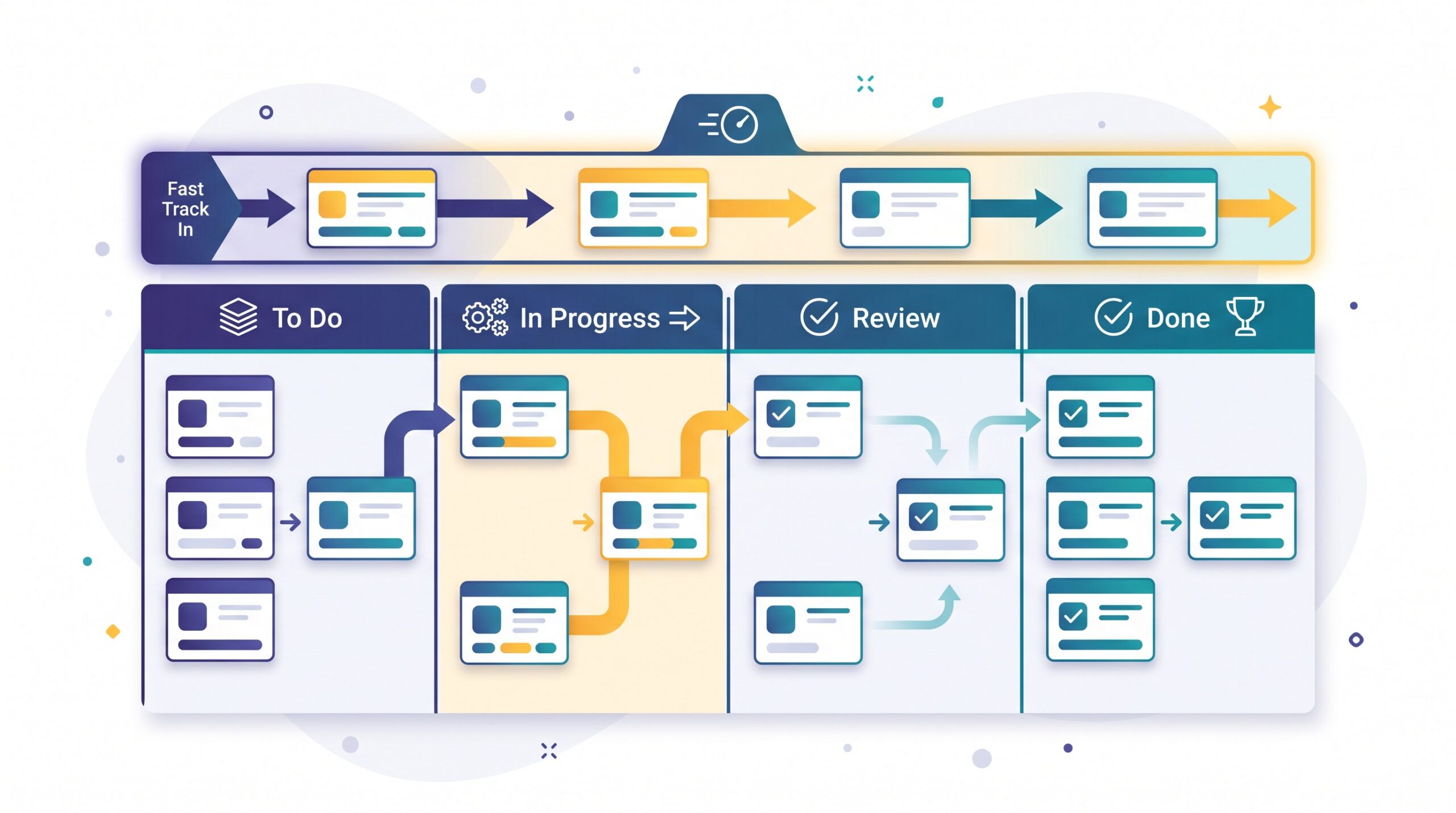
What an expedite lane actually is
An expedite lane is a single, clearly marked fast track on your board reserved for work that genuinely can’t wait. In kanban terms it’s a “class of service” — a way of signalling that a particular card gets different treatment from everything else. Most work moves through your normal columns at its normal pace. An expedite card, by contrast, jumps the queue and gets picked up immediately.
The point isn’t to create a place where anything labelled “important” can cut in line. It’s the opposite. By giving urgent work one specific, visible home, you make it obvious when something truly qualifies — and, just as importantly, when it doesn’t. The lane becomes a pressure valve, not a loophole.
Why “everything is urgent” quietly wrecks your week
When every request is treated as a drop-everything emergency, the real cost isn’t the request itself — it’s the switching. Research on workplace interruptions has found that once a task is interrupted, it takes an average of around 23 minutes to get back to it. Do that four or five times a day and you’ve lost a couple of hours to nothing but re-orienting yourself.
For a small team, that tax is brutal. The two-hour design job that should have shipped by noon now trickles out at 5pm because it was interrupted six times. Worse, constant context-switching leaves people feeling frazzled and behind even when they’ve technically been “busy” all day. An expedite lane fights this by forcing a simple question every time someone shouts “urgent”: is this worth breaking someone’s focus for, or can it wait in the normal queue?

The one rule that makes it work: one card at a time
If you take away a single idea from this article, make it this one. Your expedite lane should hold exactly one card at a time. Not three, not “a few this morning” — one.
The moment you allow two or three expedites at once, you’ve simply recreated your normal workload with a scarier label on it. The magic of the one-at-a-time limit is that it forces a real decision. If something new comes in that’s genuinely more urgent than the card already in the lane, someone has to consciously bump the current one back down. That friction is a feature. It keeps people honest about what “urgent” really means, and it guarantees that the expedite card always has your full attention until it’s done.
A tight limit like this is really just a work-in-progress limit applied to your most disruptive category of work. It caps the chaos.

Write the entry rules down before you need them
The middle of a crisis is the worst possible time to debate whether something counts as urgent. Emotions are high, the loudest voice wins, and everything feels like an emergency. So decide the rules in advance, while everyone is calm, and write them somewhere the whole team can see.
Good entry criteria are concrete and testable. For example: a paying customer is fully blocked; something is actively losing money or trust every hour; a legal or safety deadline is at stake; or a key promise to a client will be broken today. If a request doesn’t clearly match one of your written triggers, it doesn’t go in the lane — it goes into the normal backlog to be prioritised like everything else.
Writing these down does two things. It gives you a neutral, agreed reference to point to when someone insists their request is special, and it quietly trains the whole team to recognise the difference between “urgent” and “just loud.”

Make the trade-off visible
Every expedite has a cost, and that cost is always paid by something else. When a card jumps the lane, another piece of planned work gets pushed back. The mistake most teams make is hiding that trade-off, so the person who requested the urgent work never sees the ripple it caused.
Your board can make the cost obvious. When you pull an expedite card in, physically move the planned card it displaced back into the backlog or a “paused” spot rather than leaving it stranded mid-column. Now anyone looking at the board can see: we took this on, so that slipped. This isn’t about assigning blame. It’s about honest visibility. When a client or a colleague can see that their “quick favour” bumped a committed deliverable, the number of genuine emergencies tends to drop remarkably quickly.
It also protects your team from the quiet resentment that builds when their planned work keeps evaporating and nobody acknowledges why.
Run a short monthly audit
An expedite lane only stays useful if you check on it now and then. Once a month, look back at every card that went through the lane and ask a blunt question of each one: was that actually an emergency?
You’ll usually find a pattern. Maybe half of them were real, and the other half were the same recurring situation that you could plan for if you built a little slack into your schedule. Perhaps a particular client always “emergencies” on Fridays, or a certain type of request keeps arriving late because of a broken handoff upstream. Those aren’t emergencies — they’re predictable problems wearing an emergency costume. Fix the upstream cause and the fire drills stop.
If the lane is getting used several times a week, that’s a signal in itself. Either your intake process is letting too much through, or your team is genuinely under-resourced for the demand. Both are worth knowing.

Putting it into practice
You don’t need special software or a complicated framework to start — just a shared board and a bit of discipline. Here’s the short version:
- Add one expedite lane to the top of your board, clearly marked and separate from your normal columns.
- Limit it to one card at a time. A second urgent item has to wait or bump the first.
- Write your entry rules now, while it’s calm, and make them concrete.
- Show the trade-off by moving displaced work back to the backlog so the cost is visible.
- Audit monthly and fix the recurring “emergencies” at their source.
The goal isn’t to eliminate urgent work — that’s impossible. It’s to give it one honest, contained place to live so the other 90% of your week can proceed in peace. A simple kanban board with a single protected lane is often all it takes to turn chaos into something your team can actually steer.
Sources & further reading:
- Kanban Classes of Service
- Too Many Interruptions at Work? (Gallup)
- Kanban Classes of Service Explained